
Semantic markup
Semantic markup is crucial for machine readability and accessibility, defining content’s purpose, structure, and order. Use correct characters, style content thoughtfully, and avoid visual-only cues that hinder assistive technologies.
Semantic structure
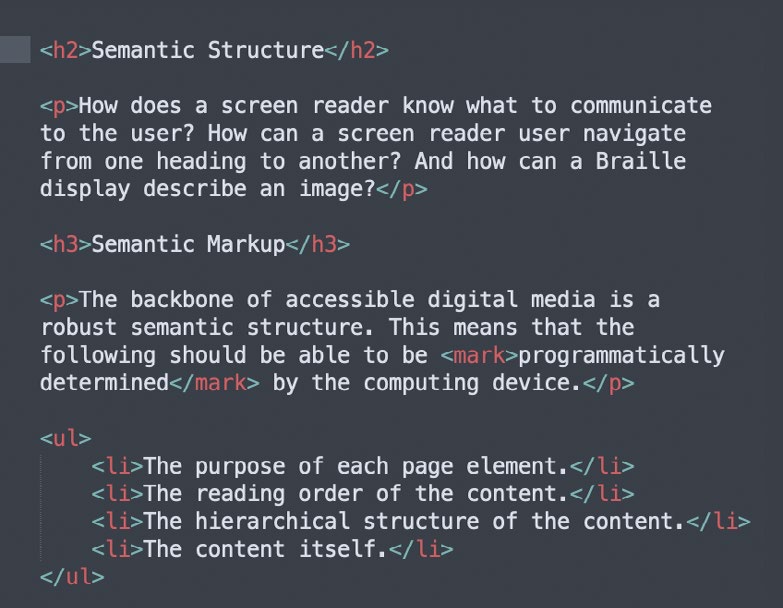
The backbone of accessible digital media is a robust semantic structure. This means that the following should be able to be programmatically determined by the computing device.
- The purpose of each page element.
- The reading order of the content.
- The hierarchical structure of the content.
- The content itself.
Most of this is accomplished by semantic markup. Every element on a page should be marked-up to describe its function, purpose, role, etc. Semantic markup is an intrinsic part of HTML (HyperText Markup Language), JSON (JavaScript Object Notation), and XML (Extensible Markup Language). It can also be applied to many other digital formats, including DOCX (standard file format for Microsoft Word), INDD (file format for Adobe InDesign), and PDF (Portable Document Format).
The ordering of these semantically defined elements is part of the semantic structure of the document.
Semantic text
The content within this semantic structure should be formatted as machine-readable semantic text. Just like the page elements, the semantic text should be marked-up as well. Furthermore, semantic text should have semantically correct character usage.
Semantic character usage
Most glyphs in a font have a clearly established name and semantic meaning. For instance, the “x” character has the semantic value of the letter “x”, while the “×” character has the semantic value of a multiplication sign. If we were to use the “x” character instead of a multiplication sign in a visual presentation, it would be unlikely to cause confusion for most sighted readers. However, if a screen reader is processing this same text, it doesn’t base its reading on the visual appearance of the characters. Its reading is based on the semantic values of the characters.
In semantic text, you should never use a character or symbol for its visual appearance. Specify characters for their meaning. Non-semantic character usage like this “Λ¢¢Є§§!ߣ€” is not accessible, no matter how it may visually appear. Always specify the most semantically correct characters for your communication intent. Non-semantic character usage can lead to confusion for assistive device users.
This doesn’t mean that designers have to make compromises in their visual presentation of semantic text. Designers should make full use of the mechanisms available to style semantic text to communicate visually as well – so long as the styling does not interfere with visitors reading that content.